Candidate Portal file type upload improvements
We've introduced security improvements to the file types users can upload across the Sage People Candidate, Agency, and Internal portals, and email services. These changes create a more consistent and reliable experience when attaching documents during registration, applications, forms, and agency submissions.
The update introduces stricter validation of uploaded files and blocks the upload of potentially harmful files like executables. You can now only upload approved and supported file types and Sage People blocks unsupported or unexpected file types automatically. This helps protect the system and ensures it captures candidate information in consistent, usable formats.
If you try to upload an unsupported file type through a portal, the system displays an error message and prevents the upload.
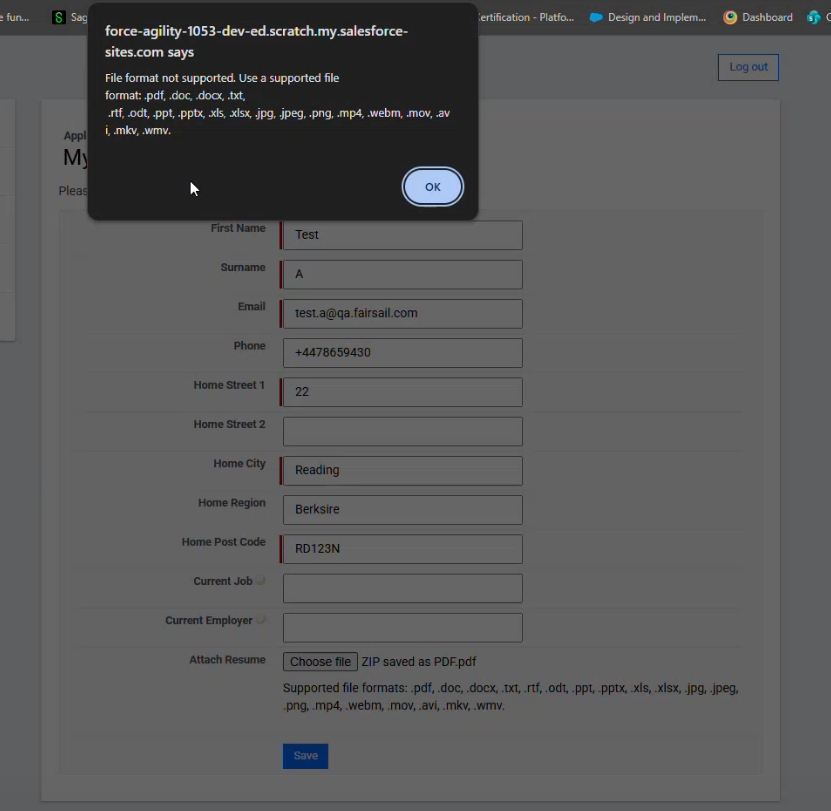
For file candidates send via email, the system excludes unsupported types automatically without detailed user feedback. Refer to the supported file type guidance in the product to ensure candidates submit documents in suitable formats.
Documents
-
PDF (.pdf)
-
Word documents (.doc, .docx)
-
Rich Text Format (.rtf)
-
Plain text (.txt)
-
OpenDocument Text (.odt)
Spreadsheets
-
Excel (.xls, .xlsx)
Presentations
-
PowerPoint (.ppt, .pptx)
Images
-
JPEG (.jpg, .jpeg)
-
PNG (.png)
Video files
-
MP4 (.mp4)
-
MOV (.mov)
-
AVI (.avi)
-
MKV (.mkv)
-
WMV (.wmv)
-
WebM (.webm)
This update simplifies file handling by enforcing consistent file standards. It reduces the need for cleanup of unsupported files. It improves system stability, lowers processing and storage overhead, and streamlines downstream workflows. This includes things like document rendering, integrations, and reporting.