Learn more about delegating access for assistants in Sage.
WX delegated access for assistants lets you designate individuals to view WX and complete actions on behalf of someone else. For example, approving completed timesheets or requests for leave. WX delegated access for assistants supports regular assistant roles, such as personal or executive assistants. They are people who are familiar with the work and level of information available to the person they're delegated to represent.
Your HR team can assign delegated access to assistants.
WX processes supporting delegated access for assistants include:
-
HR Requests
-
Time Off
-
Timesheets
The system adds manager delegated actions to the Actions Digest and the WX Actions list. This is for the Team Member you define as an assistant for that manager.
Resolution
-
From the Actions Digest, select the link to display the WX Actions list.
If you're not logged in to WX, the system prompts you to do so. Then taken to the Actions list.
If you're already in WX, select Actions in the menu.
-
Scroll to the process where you have delegated actions.
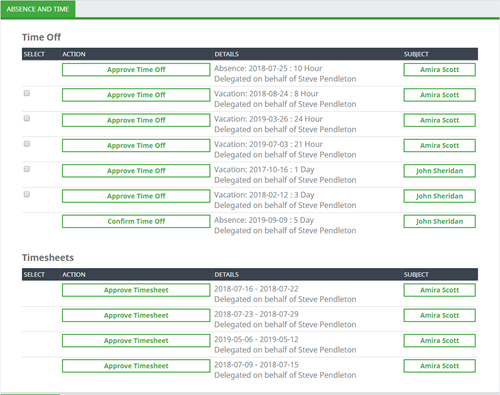
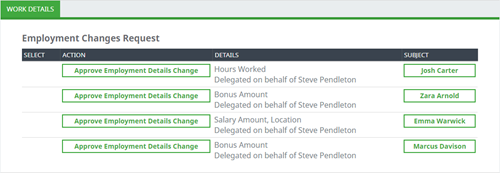
The list includes all the Manager's outstanding actions for the delegated process.
The Details column includes a summary of the action. It shows the name of the delegating Manager as Delegated on behalf of...
-
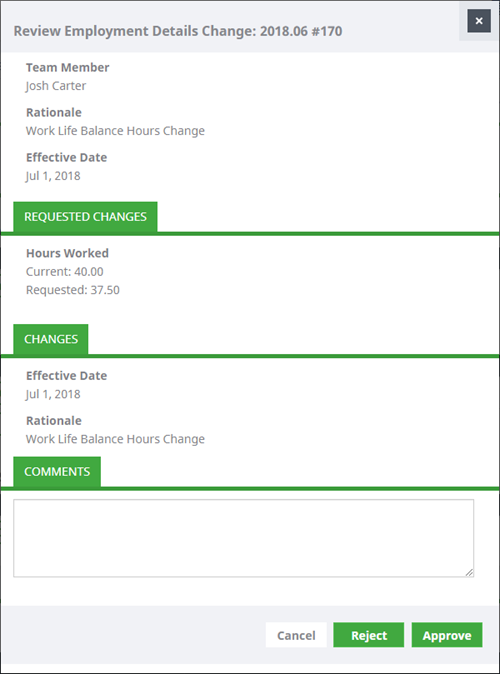
Select an Action link...

...to open the standard view for approving or rejecting the requests.